
Expense Claims Without the Eye Roll6 min read
‘My FAVOURITE part of my job is submitting expenses!’ is not something I think I’ve ever heard in the office. You have to find the receipts, enter dates and amounts, select categories, explain why costs were incurred and then wait for the claim to be approved – all a lot of effort for one claim.
For finance teams, the process can be equally frustrating. Missing information, incorrectly categorised costs, foreign currencies and unclear receipts all create additional administration.
Microsoft’s new Web App for Expense Agent in Dynamics 365 Business Central is designed to make this process considerably easier.
The app uses AI to read, categorise and organise receipts before sending completed expense reports through an approval process connected to Business Central. Crucially, employees can use the dedicated web app without having to navigate the full Business Central system, which is brilliant for those who do not need to be users of Business Central.
Why has Microsoft Created a Separate Expense Web App?

A business might have hundreds or even thousands of employees who incur expenses. However, it’s only a handful, like finance, operations and management teams, that actually need access to the ERP system.
Giving every employee access to the full Business Central environment would be unnecessary and could create additional complexity. Microsoft’s new approach is to provide employees with a simple, purpose-built web experience focused entirely on managing expenses.
Employees sign in using their Microsoft Entra account. Provided they are registered as an employee in Business Central and authorised to use Expense Agent, they can submit and manage their expenses through the web app.
This makes expense management more accessible without expecting every employee to understand Business Central.
How Does the Business Central Expense Agent Work?
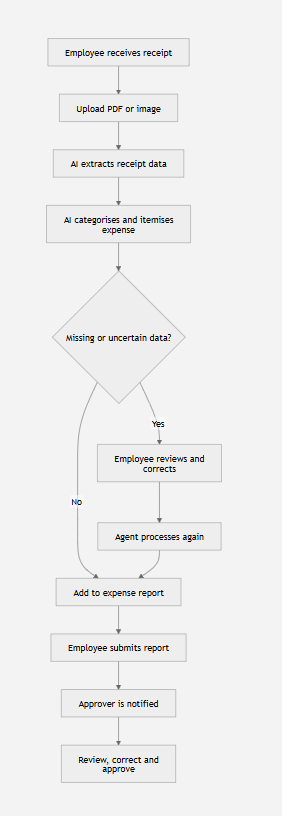
The process starts when an employee uploads a receipt.
Expense Agent can work with receipt images, scanned documents, PDFs and even some handwritten receipts. Employees can upload receipts individually or add several files together using options such as drag-and-drop.
Once a receipt is uploaded, AI analyses it and extracts relevant information, including:
- The merchant or supplier
- The transaction date
- The amount
- The currency
- The likely expense category
- The individual items shown on the receipt
The agent then checks whether the information is sufficiently complete for the expense to continue through the process.
If the receipt passes the initial checks, it can be added automatically to a default expense report. Employees do not necessarily need to create a report manually and then add every receipt individually.
AI-Powered Categorisation and Itemisation
The agent can also break down receipts into subcategories and separate expense lines. Say you have a hotel bill, it can be broken down into accommodation, food, taxes and other charges that need to be accounted for differently.
This could significantly reduce the time employees spend manually entering and categorising expenses. It should also help finance teams receive more consistent and structured information.
Just like any employee, AI will not always interpret every receipt perfectly. That is why human review remains an important part of the process.
Employees Remain in Control

Employees can open each expense, view the original receipt and check the information extracted by the AI. If something is incorrect, they can amend it before submission. They can also add business information that would not appear on the receipt itself.
For example, an employee could explain that a hotel stay related to a particular customer meeting. This context helps managers and finance teams understand why the expense was necessary rather than simply what was purchased.
This combination of AI and human oversight is one of the most valuable aspects of the application. The agent handles repetitive data entry, while employees remain responsible for confirming the information and explaining the business purpose.
Managing Missing Information and Exceptions
Rather than asking the employee to complete every field manually, Expense Agent identifies the information it cannot determine confidently.
The agent can also recognise when there is missing information submitted. This exception-based approach means employees can focus on the small number of details that require their attention instead of entering information the AI can already identify.
It should also reduce the number of incomplete claims that reach the finance team.
Organising Receipts Into Expense Reports

The agent can automatically group expenses into reports, but employees can also control where receipts are placed. If they know that a receipt belongs to a particular trip, project, customer visit or event, they can add or drag it into the appropriate expense report.
Once you are satisfied that all the receipts and information are correct, the report can be submitted for approval. The relevant approver is then notified and can use the web app to review:
- The original receipts
- Extracted transaction information
- Expense categories
- Itemised lines
- Employee notes
- The complete expense report
The approver can make permitted corrections and complete the approval process, with the expense information remaining connected to Business Central.
What are the Potential Business Benefits?
The new Expense Agent could deliver several important benefits for organisations using Business Central:
- Employees no longer have to navigate an ERP platform.
- Less manual administration needed to categorise and itemise information.
- Missing information can be identified before submission, reducing the need for Finance to chase up for further information.
- Missing or uncertain information can be identified before submission, reducing the number of incomplete claims reaching finance.
- Faster reimbursement after submission.
The Bigger Picture: Business Central is Becoming More Accessible

The Expense Agent illustrates an important direction for Business Central.
Instead of requiring everyone to work inside the ERP system, Microsoft is creating focused experiences that allow employees to participate in business processes through simpler interfaces. AI can handle the repetitive work of reading, classifying and checking information, while employees and finance teams retain oversight and control.
For organisations already using Business Central, or considering moving to it, the new web app could help reduce administration, improve the employee experience and give finance teams better-quality information.
Would Expense Agent Work for Your Business?
Cloud9 helps organisations use Microsoft Dynamics 365 Business Central, cloud technology and AI to simplify processes and create better experiences for employees and customers.
If you would like to explore how Business Central and its emerging AI capabilities could support your finance operations, contact our team at sales@cloud9insight.com.